Tuesday, October 10, 2017

New products based on ESP32

It was a matter of time until some product on the market will incorporate the ESP32 as the core controller. TECHBASE's first industrial gateways series is based on new ESP32 chips.

They are selling it in two variants ModuinoX1 and ModuionoX2 For the second one you get:

  • more DIO ports
  •  microSD 
  •  2 extra analog inputs 
  •  a wider form factor.
Moduino X1 and Moduino X2


On request both modules can be shipped with:

  • LoRa
  • SigFox
  • LTE NB 
  • Zigbee
  • OLED 0.96″ 128×64


Bluetooth and WiFi are provided by default since are encapsulated into the ESP32.

Moduino is not coming with the software, its up to you  to write your software. Still not clear if you can put them in sleep mode for battery power applications.

Price range is not published at this time you will need to contact them.

You can find more informations about the products here and here.

Wednesday, November 9, 2016

ESP32 Linux development environment

To setup the development environment for ESP32 is more simple like it was for the ESP8266.

There are few easy steps ( you can found them also here).

1. Download lubuntu-16.04.1-desktop-amd64.iso file and the 
After you installed you lubuntu VM ( 64 bits) and the VBoxGuestAdditions_5.1.6.iso ( for full screen, shared directories between the windows and Linux, shared clipboard)

2.Install the Lubuntu iso image using the Virtual Box

3.Open a terminal and issue sudo apt install build-essential

4.Mount the VBoxGuestAdditions_5.1.6.iso and run the VBoxLinuxAdditions.run as root from /media/your_username/VBOXADDITIONS_5.1.6_110634 directory


Now you are ready to install the ESP32 environment.
You can follow the steps from 5 to 10 or get the right scripts from https://github.com/bcatalin/ESP32 and run it. It will do the steps from 5 to 10 for you.


5. Install the applications:
sudo apt-get install gawk gperf grep gettext ncurses python python-dev automake bison flex texinfo help2man libtool

6.Create a directory:
 make ~/esp32
This will create a directory in the /home/<your_username>/

7.Download the binary toolchain
cd ~/esp32
wget https://dl.espressif.com/dl/xtensa-esp32-elf-linux64-1.22.0-59.tar.gz
Untar the archive using 

tar xvf xtensa-esp32-elf-linux64-1.22.0-59.tar.gz

This will create a directory named xtensa-esp32-elf/ int the /home/<your_user>/esp32/

7.Update the PATH variable with the xtensa toolchain

export PATH=$PATH:$HOME/esp32/xtensa-esp32-elf/bin
Attention: This command will set the PATH just for the current terminal and for the current session. To make this permanent update the .bashrc file in the /home/<your_name>/ directory.

To check this open a new terminal and issue the command 

echo $PATH 

and you should see the esp32/xtensa-esp32-elf/bin in the output.

8. Get ESP-IDF from github

cd ~/esp32
git clone --recursive https://github.com/espressif/esp-idf.git
cd ~/esp32/esp-idf
git submodule update --init
9.Download a template application
cd ~/esp32
git clone https://github.com/espressif/esp-idf-template.git myapp
You will have now in the /home/<your_username>/esp32 a directory named myapp.

Update again the .bashrc file if you are not planning to move the IDF directory and add the following line at the end of /home/<your_username>/.bashrc

export IDF_PATH=$(pwd)/esp32/esp-idf

10. Configure and run your firs application

Go to /home/<your_username>/esp32/myapp and issue command

make menuconfig

that will adapt the sdkconfig according to your project and then compile it with

make


To flash it to the ESP32 use the 

make flash 

command.


Job done !


ESP32 increase the maximum number of sockets

Still didn't found an ESP32 with a decent delivery price so today I've tested the environment provided by EspressIf looking on the maximum number of sockets. On ESP8266 I've managed to have more then 20 sockets opened and carrying MQTT packets ( see https://myesp8266.blogspot.co.uk/2016/11/mqtt-broker-on-esp8266-5.html)

I've noticed that the maximum number of sockets that you can setup from make menuconfig is 16. 

All the values that you are setting from make menuconfig are ending in a file named sdkconfig in the root of you app directory. This sdkconfig file will be converted to sdkconfig.h located in app/build/include/sdkconfig.h.

Even you are modifying a value direct in the sdkconfig on the compile time you will be invited to enter a value 1..16 for maximum number of sockets.

Solution #1. (Safest one)

Change the sdkconfig.h file overwrite the desired value and recompile

#define CONFIG_LWIP_MAX_SOCKETS 20

Solution #2. (not recommended but possible )

Modify directly the file:

esp-idf/components/lwip/include/lwip/port/lwipopts.h
#define MEMP_NUM_NETCONN          20 //CONFIG_LWIP_MAX_SOCKETS


If you modified values in make menuconfig and you don't know what was before don't worry just do a diff between the app/sdkconfig and app/sdkconfig.old file.


Wednesday, October 12, 2016

ESP32 is on preorder


Good new today !!!

Today the ESP32 is on preoder on banggood. Delivery will start by the end of October.

If you are in the first 50 orders $7.69, up to 200 $8.69 and $9.69 after that.


As a reminder the specs from the official espressif site are:

Key Features

  • 240 MHz dual core Tensilica LX6 microcontroller with 600 DMIPS
  • Integrated 520 KB SRAM
  • Integrated 802.11BGN HT40 Wi-Fi transceiver, baseband, stack and LWIP
  • Integrated dual mode Bluetooth (classic and BLE)
  • 16 MByte flash
  • 2.2V to 3.6V operating voltage
  • -40°C to +125°C operating temperature
  • On-board PCB antenna / IPEX connector for external antenna


Sensors

  • Ultra low noise analog amplifier
  • Hall sensor
  • 10x capacitive touch interface
  • 32 kHz crystal oscillator


32x GPIO

  • 3 x UARTs, including hardware flow control
  • 3 x SPI
  • 2 x I2S
  • 12 x ADC input channels
  • 2 x DAC
  • 2 x I2C
  • PWM/timer input/output availabe on every GPIO pin
  • OpenOCD debug interface with 32 kB TRAX buffer
  • SDIO master/slave 50 MHz
  • Supports external SPI flash up to 16 MB
  • SD-card interface support


Security Related


  • WEP, WPA/WPA2 PSK/Enterprise
  • Hardware accelerated encryption: AES / SHA2 / Elliptical Curve Cryptography / RSA-4096


Performance

  • Supports sniffer, station, softAP and Wi-Fi direct modes
  • Max data rate of 150 Mbps@11n HT40, 72 Mbps@11n HT20, 54 Mbps@11g, and 11 Mbps@11b
  • Maximum transmit power of 19.5 dBm@11b, 16.5 dBm@11g, 15.5 dBm@11n
  • Minimum receiver sensitivity of -98 dBm
  • 135 Mbps UDP sustained throughput
  • 2.5 μA deep sleep current


Saturday, September 3, 2016

MQTT Broker on ESP32 #2

MQTT Broker on ESP32

I've managed to put an MQTT broker on ESP32 (aka ESP31B).

The code is under development and ESP32 at this time is not yet released, but when it will be I'll also have the code complete. There are some problems but let's hope they will be resolved by the Espressif System. 

I will try to see if I can do the same with ESP8266 which is already on the market. 


Don't forget that the same broker is running on its little brother ESP8266. Check it here.

Monday, May 23, 2016

MQTT Broker on ESP32

Code from ESP8266 has been ported to ESP32 module, except the WI-Fi configure that was using  functions not present into the FreeRTOS SDK.

Everything is working great, having more heap is a big relief. In the next SDK EspressIf must tune a little bit the window sizes and some buffers in FreeRTOS so will achieve same performance like the ESP8266 FreeRTOS SDK.

Friday, January 15, 2016

ESP32 OTA

According to the documentation ESP32 can have up to 5 images to boot from. That is nice.


Monday, December 28, 2015

First program

After the Christmas now let's get back to do some work.

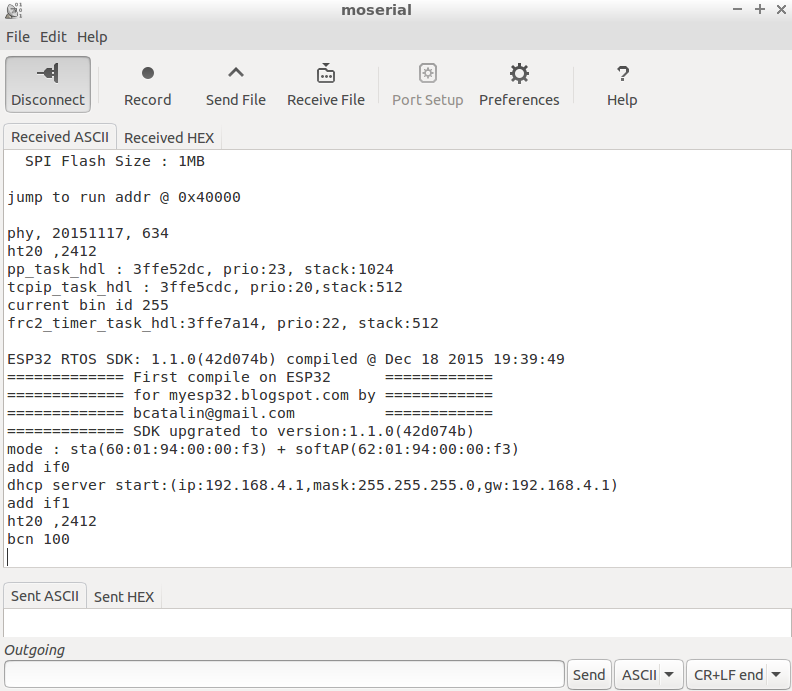
I've updated the SDK from 1.0.0 to 1.1.0 and I've flashed for the first time the ESP32.


 ./burnEsp32 
Connecting...
Erasing flash...
Erase size 1400 num_blocks 5 offset 0
FLASH_BEGIN failed, applying ESP32 workaround...
Wrote 5120 bytes at 0x00000000 in 0.6 seconds (69.9 kbit/s)...
Erasing flash...
Erase size 2800 num_blocks a offset 4000
Wrote 10240 bytes at 0x00004000 in 1.2 seconds (69.9 kbit/s)...
Erasing flash...
Erase size 3c800 num_blocks f2 offset 40000
Wrote 247808 bytes at 0x00040000 in 28.6 seconds (69.2 kbit/s)...

Leaving...
Erase size 0 num_blocks 0 offset 0


and some printfs:


and first connection to my WiFi router:


Now if the setup is working I should start by moving all my work to from ESP8266 non RTOS to RTOS and test it on ESP32.


Tuesday, December 22, 2015

It's a boy, it is ESP32

I've managed to solder the ESP32 board to its docking board.

After connecting the console everything is up and running.


And looking with my phone I can see the ESP32 in AP mode. 


Monday, December 21, 2015

Finally home

I just receive the module. Is so tiny but powerfull.

Need to solder it to the main board.


Work in progress...Do not disturb.


ESP32 on its way to me

Since the EspressIf Systems were so kind to send me a predecessor of the new ESP32, code name ESP31, which by the way is on its way to me, I will tell you a little about it.

I've received the documentation about the ESP32  before the module, so I've start reading it and I can tell you that I can't stop reading it. More I read, more ideas are coming about what can I do with it.


ESP32 will have its own market and is NOT a replacement for the ESP8266, but I am sure that both will work together like a charm. So, don't waste your time, start working with ESP8266 and later move your work to ESP32 if it is necessary.

I can not post here the documentation, but I can tell you that ESP32 business is an unicorn.

Wednesday, December 2, 2015

Setup environment for ESP32

In order to develop something with the ESP32 you need to setup the environment for it.

I am hopping that Santa will bring me an ESP31 ( the prerelease model for ESP32).

Usually I create a VM for this. After I've installed the lumbuntu 15.04 in a Virtual Box and the Guest Addition now is time for compiler stuff.

The following commands are from espressif github with few modification for using the lumbutu i386 VM.


Step 1. Install the required toolchain packages.

sudo apt-get install git autoconf build-essential gperf bison flex texinfo libtool libncurses5-dev wget gawk libc6-dev python-serial libexpat-dev libtool-bin

Step 2. Create a directory (e.g./opt/Espressif) to store the toolchain.

sudo mkdir /opt/Espressif

Step 3. Make the current user the owner.

sudo chown $USER /opt/Espressif/

Step 4. Download the latest toolchain installation file to the directory created in Step 2.

cd /opt/Espressif/git clone -b esp108-1.21.0 git://github.com/jcmvbkbc/crosstool-NG.git

Step 5. Install toolchain.

cd crosstool-NG./bootstrap && ./configure --prefix=`pwd` && make && make install
./ct-ng xtensa-esp108-elf
./ct-ng build

The command ./ct-ng build takes some time(30-40minutes), so grab a coffee or a cup with tea.
Step 6. Set the PATH variable to point to the newly compiled toolchain.

export PATH=/opt/Espressif/crosstool-NG/builds/xtensa-esp108-elf/bin:$PATH

Note: You need to do Step 6 once you open a new shell, or you can put it inside your .bashrc file

Project template Compile

Step 1. Create a directory (e.g.~/Workspace) to store a new project.

mkdir ~/Workspace

Step 2. Clone ESP32 RTOS SDK.

cd ~/Workspacegit clone https://github.com/espressif/ESP32_RTOS_SDK.git

Step 3. Copy ESP32_RTOS_SDK/examples/project_template to Workspace directory created in Step 1.

cp -R ~/Workspace/ESP32_RTOS_SDK/examples/project_template ~/Workspace/

Step 4. Create a directory (e.g.~/Workspace/ESP32_BIN) to store the bin files compiled.

mkdir ~/Workspace/ESP32_BIN

Step 5. Set SDK_PATH as the path of SDK files and BIN_PATH as the path of .bin files compiled.

export SDK_PATH=~/Workspace/ESP32_RTOS_SDK
export BIN_PATH=~/Workspace/ESP32_BIN

Notice: Make sure you set the correct paths, or it will occur a compile error.
Step 6. Start to compile files

make cleanmake

Now in ESP32_BIN directory you have the bin files.


Monday, November 30, 2015

Esp32 rtos sdk released

Esp32 RTOS SDK has been release at address

https://github.com/espressif/ESP32_RTOS_SDK

Good hunting!

Saturday, November 7, 2015

Big news for ESP32

According to cnx-software.com the ESP32 will have IPv4 and.......IPv6 support.

Now unleashed the IoT dogs :-)


Thursday, November 5, 2015

New kid in town - meet ESP32 an "ESP on steroids"


05 November 2015 Espressif announced an "ESP on steroids"  ESP32. See below the communicate.

If ESP8266 was a big hit, I am expecting the same for the ESP32 which has more from everything (processing power, memory, IO etc) and is running RTOS.